User Guide
Unlock the full power of intelligent search and immersive learning
Learn Concepts from the Source

This isn't just listening to lectures — learn directly from the technology carrier. Understand the concepts conveyed with full support in the original language and yours. Experience the authentic voice, emotions, and context exactly as delivered.
Access over 2,000 audio lectures with synchronized transcripts in English, Russian, and German. The library contains approximately 2,070 lectures in English, ~700 in German, and ~700 in Russian. Each lecture has a synchronized transcript with precise word-level timing, allowing the text to highlight exactly as the speaker says each word.
The unique feature is simultaneous multi-language synchronization: audio plays while transcripts in multiple languages highlight in perfect sync. Some lectures have one translation, others have two (Russian and German alongside English). This means you can follow along in your native language while hearing the original, compare translations to see how concepts are expressed differently, and switch focus between languages without losing your place.
Why listen to the original? The original language preserves the speaker's emotions, humor, emphasis, and subtle nuances that translations can't fully capture. You'll feel the author's intent, catch the jokes, and understand the context better. Translations help when needed, but the original gives you the authentic experience — learn directly from the technology carrier, understanding the concepts exactly as they were conveyed.
Note: Access to lectures requires authentication. Please log in to use this feature.
Multi-Language Synchronization
When you open a lecture, you'll see transcripts displayed side-by-side or stacked vertically. As the audio plays, each language's transcript highlights in perfect synchronization. If a lecture has Russian and German translations, you'll see all three languages (English, Russian, German) highlighting word-by-word simultaneously. This means:
- You can follow along in your native language while hearing the original — catch the speaker's tone, emphasis, and emotional nuances
- You can compare translations to see how concepts are expressed differently, deepening your understanding of the material
- You can switch focus between languages without losing your place — all transcripts stay synchronized
- Some lectures have only one translation, others have two — the system shows what's available
Why the original matters: The original language preserves the speaker's emotions, humor, emphasis, pauses, and subtle nuances that translations can't fully capture. You'll feel the author's intent, catch the jokes, understand the context better, and experience the authentic delivery that makes the content come alive.
Two Highlighting Modes
Toggle between two ways to follow along:
- Sentence-Level Highlighting: Highlights entire sentences as they're being spoken. Better for understanding context and flow. The current sentence gets a background highlight, making it easy to see the full thought.
- Word-Level Highlighting: Shows exactly which word is being spoken at each moment. A visual indicator moves along the transcript, highlighting individual words. Perfect for catching every detail and following the speaker's precise timing and emphasis.
Toggle between modes using the highlight mode button. Your preference is saved automatically.
Personal Dictionary Per Lecture
Each lecture has its own personal dictionary. When you add a word to your dictionary for a specific lecture, it's automatically highlighted throughout that lecture's transcript. Words from different lectures are kept separate — your dictionary for Lecture A doesn't mix with Lecture B. This lets you track vocabulary progress lecture by lecture.
Workflow: Click a word → see definition → add to your personal dictionary → word gets highlighted everywhere in this lecture → build your vocabulary as you listen.
Deep Dictionary Search
Double-click any word in the transcript to open the full dictionary modal. This isn't just a simple definition lookup:
- Multiple Dictionary Sources: Search across different dictionaries and select which sources to use. Each source may have different definitions, examples, or concepts.
- Concept Exploration: Find related concepts and terms. The search shows not just definitions, but connections between ideas.
-
Double-Click Navigation: Words you add to your personal dictionary show their definitions. Double-click any word inside a definition to search for it in dictionaries. If you add that word, it links back to the original word (the one whose definition you were reading).
Build Word Chains — This is Powerful!
This creates connected word chains — explore definitions as deep as you need, with each word connected to where you found it. Follow concepts through multiple layers, building your understanding step by step. Start with one word, explore its definition, find related terms, and keep going deeper. This is one of the most powerful features for deep learning and concept exploration!
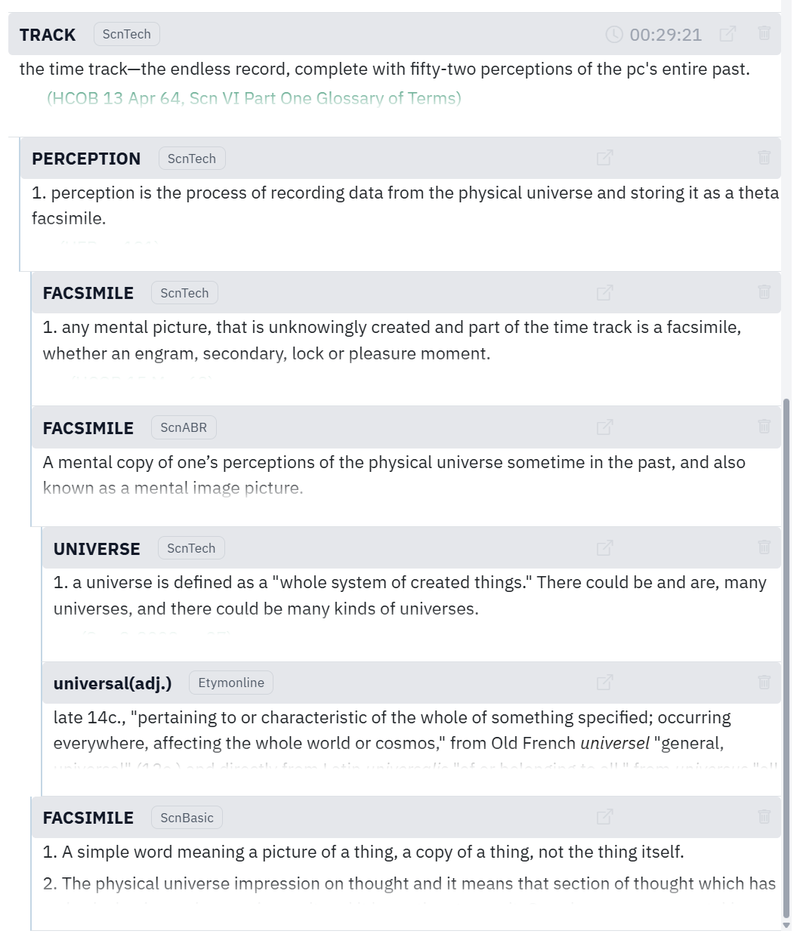
- Add to Dictionary: From the modal, you can add words directly to your personal dictionary for the current lecture.
Rich Bookmarks with Comments
Bookmarks are more than just time markers — they're your personal study notes. When you create a bookmark, you can immediately add a comment explaining why this moment is important, what you learned, or questions to revisit. Edit comments anytime to update or expand your notes.
Visual Markers: Each bookmark appears as a colored dashed underline in the transcript, making it easy to spot important moments at a glance. You can choose the color for each bookmark, allowing you to categorize them visually (for example, use different colors for different types of concepts or questions).
Quick Navigation: All your bookmarks are organized in the bookmarks panel, grouped by language and sorted by time. Click any bookmark in the list to instantly jump to that moment in the lecture. The transcript scrolls smoothly to show the bookmarked text, and the audio seeks to that exact position — perfect for quickly returning to important sections.
Study workflow: Listen → bookmark important moments → choose a color → add comments explaining key concepts → review bookmarks later → click to jump back instantly → deepen understanding.
Smooth Auto-Scroll
The transcript automatically scrolls with smooth 500ms animation to keep the current word centered. You never lose your place, and the scrolling feels natural, not jarring. Works perfectly with multiple languages — all transcripts scroll in sync.
Tips
- Speed for Understanding: Use slower speeds (0.5x–0.75x) for complex or dense content where you need to absorb every detail. Use faster speeds (1.5x–2x) for review or when you're already familiar with the material.
- Language Comparison: When a lecture has multiple translations, compare them to see how concepts are expressed differently. But remember: the original preserves the speaker's authentic voice, emotions, and humor — translations help clarify, but the original gives you the full experience.
- Dictionary Chains: Use double-click to follow concept chains. Start with one word, explore related terms, build deeper understanding.
- Detailed Bookmark Notes: Don't just bookmark — add detailed comments. Explain concepts, note connections, ask questions.
- Switch Highlighting Modes: Use word-level for precise learning, sentence-level for context. Switch based on what you're focusing on.
Keyboard Shortcuts
Control playback without touching your mouse. All shortcuts work when no input fields are focused:
- Space — Play or pause the audio
- ← / → — Rewind 10 seconds back or fast-forward 10 seconds ahead
- ↑ / ↓ — Increase or decrease volume (increments of 10%)
- + / - — Increase or decrease playback speed